
Features
Everything a property management office does, in one place.
All of it comes with every account. Nothing on this page is a paid add-on or on a roadmap; it is what Optima Flow does today.
Built-in AI
AI that takes the first pass on the everyday work and hands anything that needs a decision to a person. It is part of the product, not an add-on.
A front desk for tenant messages
Tenant messages are read as they arrive. A repair becomes a work order in the tenant’s own words, a lease question is answered from their lease, and anything needing a decision goes to your team.
Repair troubleshooting
When a tenant reports an issue, Optima Flow walks them through simple checks one step at a time. Many fixes never need a technician; the rest arrive as a clear work order.
Renter questions, answered carefully
Questions about a listing are answered only from that home’s facts and your published criteria, with fair housing rules built in. Anything else goes to the office with a draft reply.
Listing descriptions
Draft a listing description from the home’s details in one click, then edit it before you publish.
Move-out photo comparison
Move-out photos are compared with the move-in set item by item: no change, ordinary wear or damage. It is a suggestion for your team, never a charge on its own.
Ask how to do anything
Type a question like “how do I renew a lease” in the search box and get the steps, with a link to the right page.
Trust accounting
Books a broker can sign. Every owner and every deposit has its own ledger, and the trust account ties at all times, not only at month end.
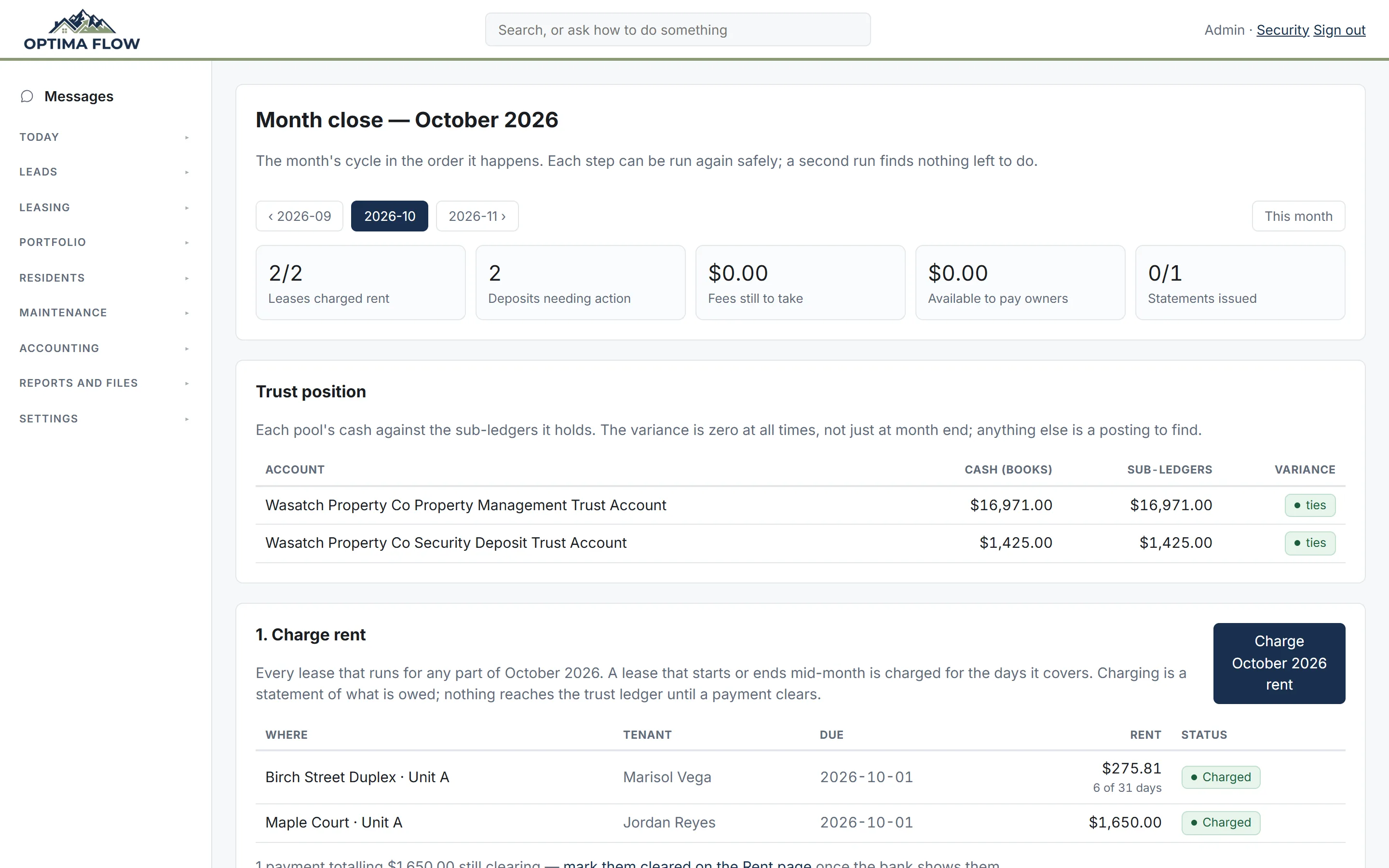
Trust that always ties
Cash in each trust account is checked against the ledgers it holds. Any difference shows up the day it happens, not at audit time.
Month close, in order
Charge rent, take fees, pay owners and issue statements from one page. Each step is safe to run twice; the second run finds nothing left to do.
Three-way reconciliation
Import the bank statement, match the obvious lines automatically, and reconcile each trust account every month with the broker sign-off built in.
Owner money stays separate
A bill that one owner cannot cover waits for rent or for the owner to add funds. It is never paid from someone else’s money.
Owner statements and 1099s
Statements with a PDF, split by property the way Schedule E wants. 1099s for owners and vendors are prepared and sent from the same records.
Your company’s own books
Company expenses, receipts you snap or email in, company cards, bank rules that book regular charges for you, and a profit and loss.
Rent and collections
Tenants pay from their bank, late fees run on schedule, and the hard conversations follow the same steps every time.
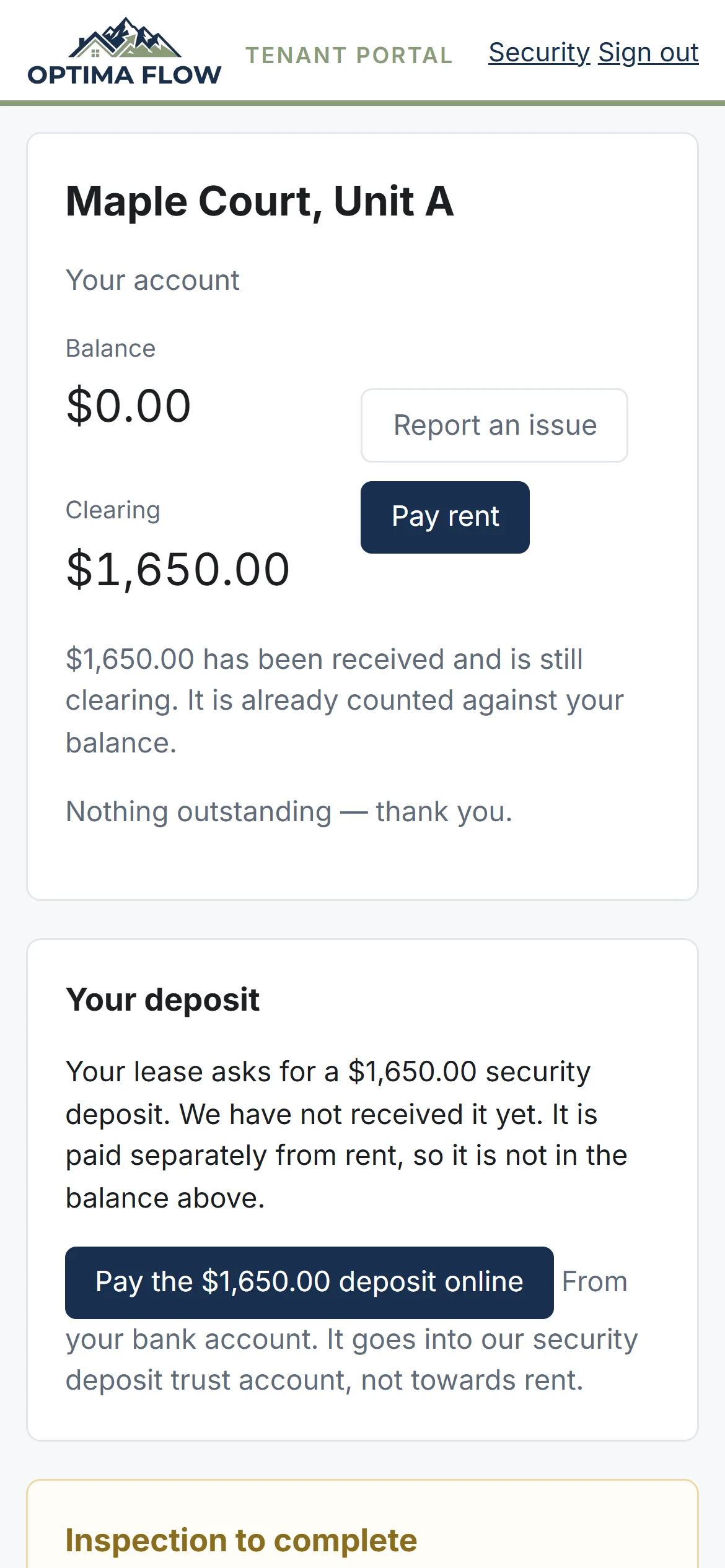
Online rent and autopay
Tenants pay rent and deposits from their bank account, or turn on autopay with a ceiling they choose.
Checks, cash and money orders
Record a payment by hand in seconds; it reaches the trust ledger when it clears.
Late fees on schedule
Your lease’s late day and fee are applied automatically, and you can waive one with a reason.
Notices and payment plans
Serve a three-day notice, set up a payment plan, and hand a case to your eviction attorney with the ledger attached.
Who is behind, at a glance
A delinquency report and a Today item for every tenancy that falls behind.
Leasing
From the vacancy to the signed lease without leaving the system.
Listings and syndication
Public listing pages for every vacancy, posted to Zillow and other sites through Intellirent or RentSpree, with the leads coming back into your inbox.
Showings, including self-guided
Renters book open showing times themselves and get reminders. Vacant homes can have a lockbox for self-guided tours.
Applications and screening
Publish your criteria, review applications, screen pets and assistance animals, and get reminded when an adverse action notice is owed.
Renewals
Renewal notices go out ahead of time to tenant and owner, at your standard increase, and the new lease links to the old one.
E-sign
Leases, management agreements and any other document signed online, with no separate e-signature subscription and no per-document fees.
Made from your templates
Leases and management agreements are made from your own Word templates, with names, rent, fees and dates filled in from the records.
Any file, signed
Upload a Word, Excel, PowerPoint or PDF file and send it for signature. Office files are turned into a PDF so everyone signs the same thing.
Signature spots found for you
Optima Flow reads the document and places the signature, initial and date spots for each signer, including on scans. You check them before it goes out.
A summary signers can check
Signers can open a plain-English summary of the document, and every point names the page it comes from.
Signing order and delivery
Send to signers in order or all at once, see whether each signing email was delivered, and send a fresh link when one expires.
Filed where it belongs
Everyone gets the signed copy by email, and it is filed on the lease or owner it belongs to. Signing a management agreement records its date.
Lead management
Owner and renter leads from every source in one inbox, answered fast and followed up until they say yes or no.
One inbox for every source
Each lead service, listing site and your website gets its own inbox address, so every lead arrives in Optima Flow with its source attached.
Instant replies
New leads get an answer within moments, and renters’ questions about a home are answered from its listing and your criteria.
Shared fairly
Website leads are assigned round-robin across your team, with an alert so nobody sits on one.
Follow-up sequences
Write email follow-ups with their timing. A reply pauses the sequence, and winning or losing the lead stops it.
Referral partners
Track the agents and investors who send you owners, and the fee owed when a referral signs.
Which sources pay
See owner leads, owners won, doors under management and spend by source, so you know where your marketing money works.
Maintenance and inspections
Work orders that move, vendors you can trust, and condition records that hold up at move-out.
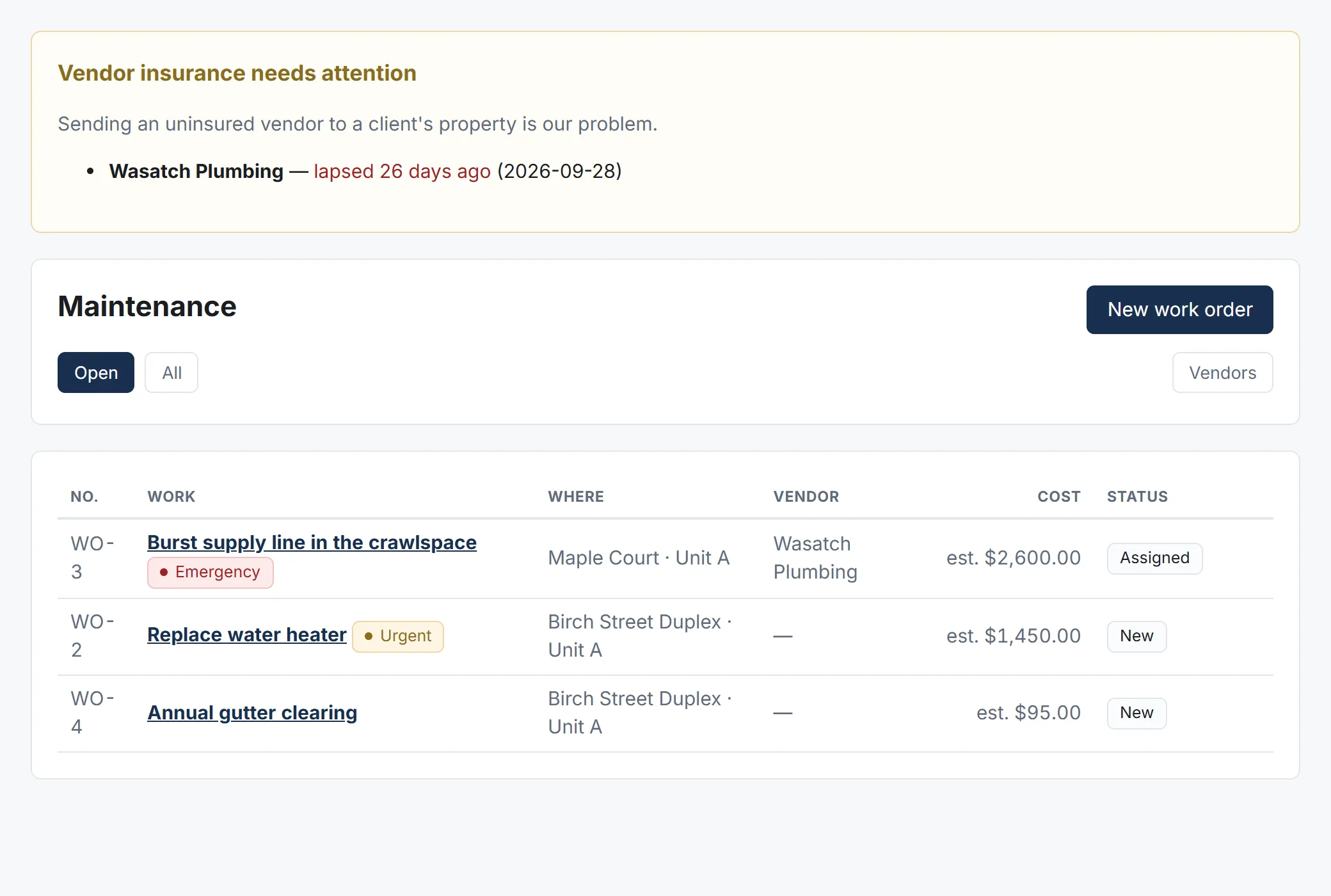
Work orders
Tenants report issues from their phone with photos. You set priority, send the job to a vendor and track cost against the owner’s approval limit.
Vendor portal and insurance
Vendors accept jobs and send invoices in their own portal. A lapsed insurance certificate is flagged before you send them out.
Inspections with photos
Move-in, move-out and periodic inspections with photos and video, tenant self-inspections, and schedules that repeat.
Deposit statements on time
Itemised deposit statements with the legal deadline counted down on your Today page.
Care plans
A preventive maintenance plan for each home that the owner approves once, then work orders and reminders follow on their own.
Owner and tenant portals
Owners and tenants answer their own questions, on any phone, so fewer of them call.
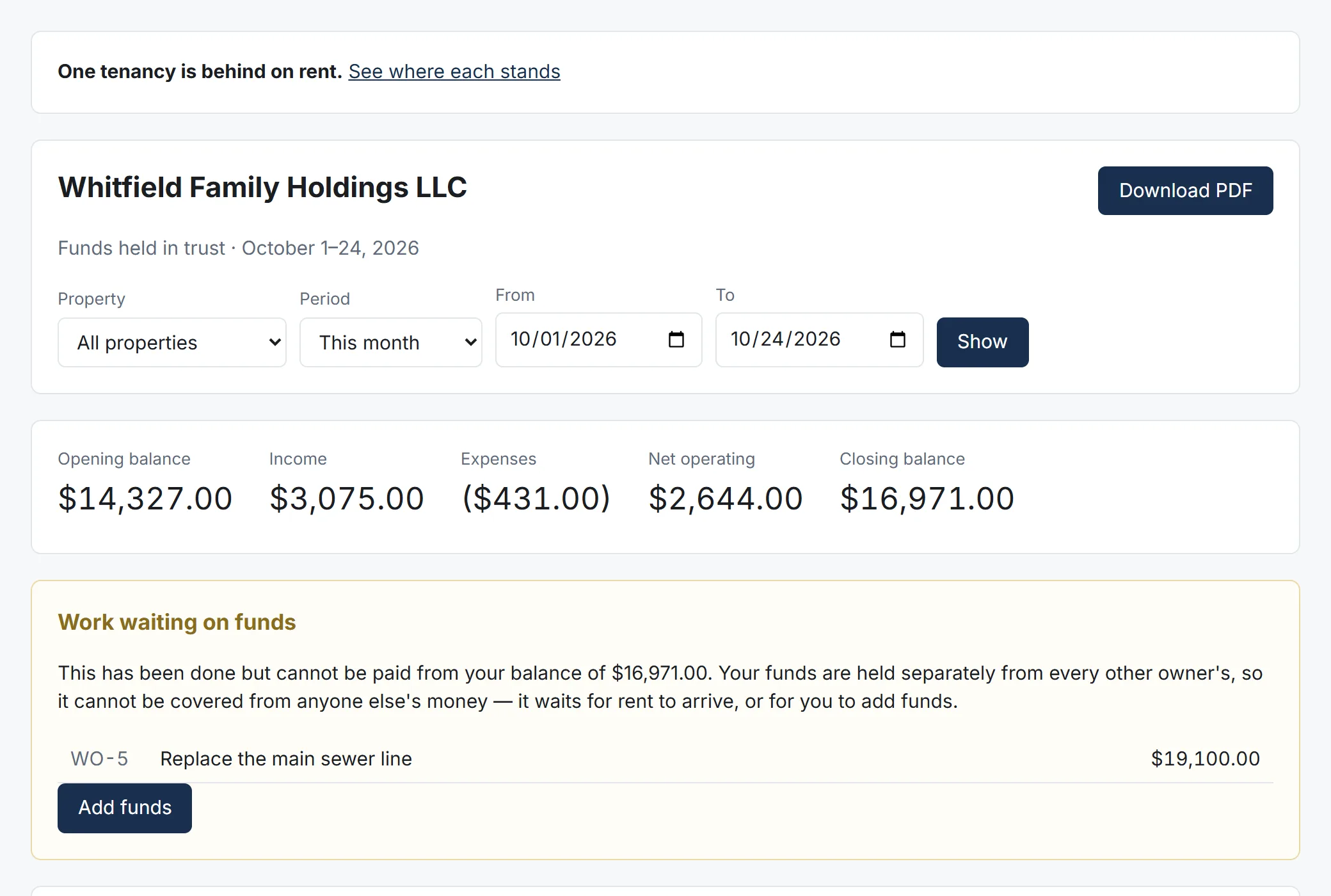
Owner portal
Statements, properties, leases, listings, maintenance, inspections, documents, tax forms and the bank account they are paid into.
Tenant portal
Balance, pay rent, autopay, report an issue, messages, notices, inspections and documents.
Messages with photos
One inbox for tenant, owner and vendor messages, with a count of conversations waiting on the office.
Phone apps
An Android app on Google Play and an iPhone home-screen app, both with notifications.
Notices to everyone
Send an announcement to every tenant, owner or vendor at once, and see every email the system has sent.
Running the office
Less to remember. The system works out what needs a person and puts it in front of the right one.
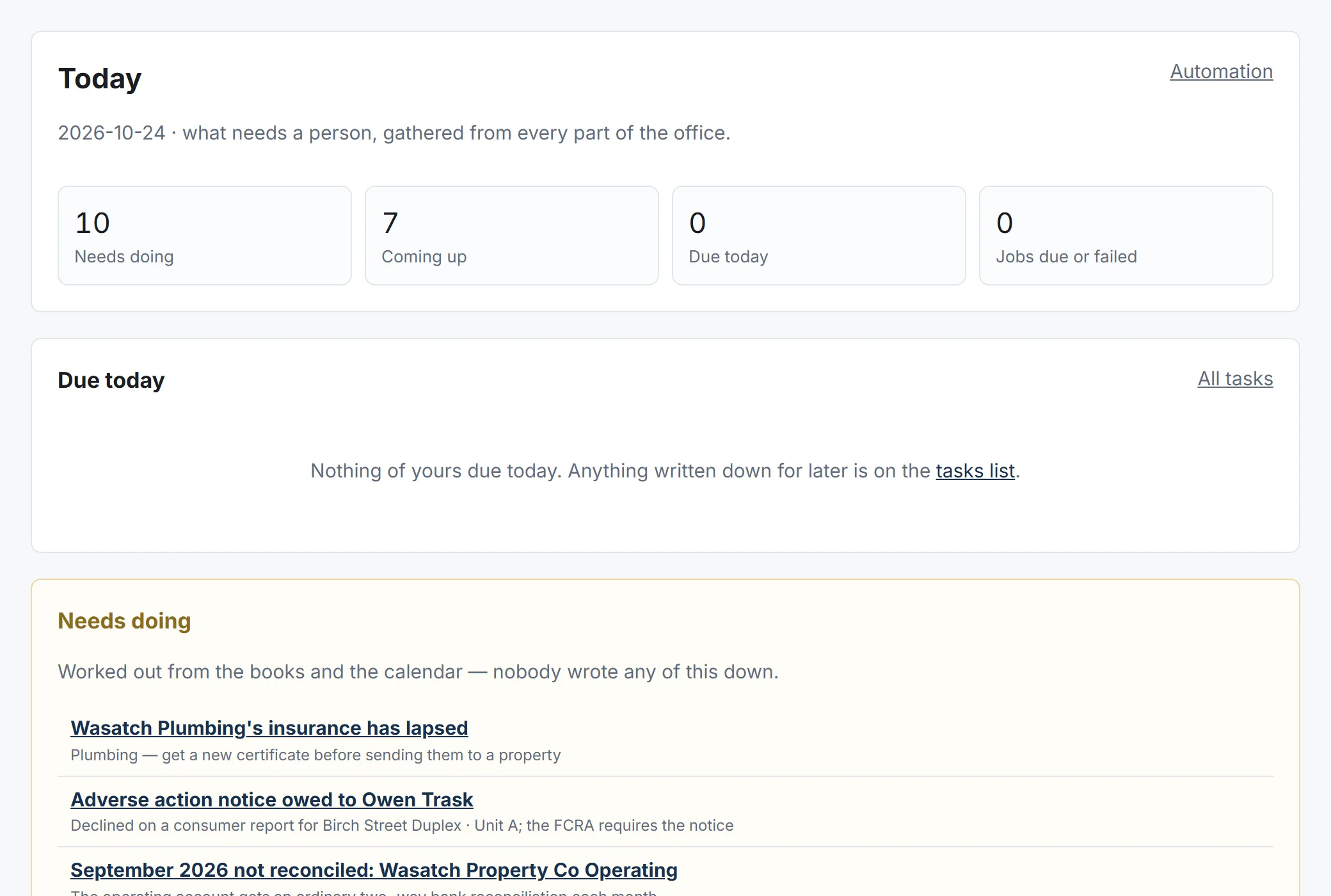
Today
One page of what needs a person, worked out from the books and the calendar. Nobody has to write it down.
Checklists
Move-in, turnover, move-out, renewal and new-owner checklists that you can change, with photos required where you want them.
Owner leads and referral partners
Track owner leads from your website and lead services, referral partners and what they are owed.
Take over a portfolio
Bring another manager’s owners, leases and balances in with a guided takeover.
Audit log and security
See who changed what. Staff roles, a principal broker, two-step sign-in and passkeys.
Try it on your own portfolio, free for 3 months.
No card to start. We set up your company, help you bring your owners, tenants and balances over, and you decide at the end.